ETA for the United Kingdom: the official application, screen by screen, with someone beside you
The ETA is cheap, fast and unforgiving: £20, usually approved in minutes, impossible to edit once paid. One passport number misread by the app and the airline scanner says no. Open the official app or site in one hand and this guide in the other, and move screen by screen: what to do with your passport, the trap of that screen, and what the travellers before you ran into.
Step by step9 steps, in the order you will see them.
Real experiences on every step45 travellers in their own words, dated and linked to their source.
Free, no accountNothing leaves your browser. We never file anything for you.
Checked at the sourceRules checked on gov.uk on 16 Oct 2026; captures taken on 12 Oct 2026.
Official fee£20≈ $26.50 / €23.60 at the ECB rate of 15 Oct 2026, before the conversion fee · since 8 April 2026 (£16 before) · never refunded
Where, and only theregov.uk/etathe "UK ETA" app by the Home Office, or the online form it links to
Decisionminutes to 3 working daysmost are automatic within minutes; apply at least 3 working days before you fly
Valid for2 yearsor until the passport expires · unlimited trips · 6 months per stay
Before you open the official app or site
The passport you will travel with, the real one: the app photographs its photo page and reads its chip, and the ETA is tied to that passport number for two years
Your phone with NFC (the thing that lets you pay contactless) for the app, or a computer and a recent, plain-background photo of your face for the online form
An e-mail address you can open right now: a 6-digit code arrives during the application, and the decision arrives there too
Your home address, your job, and for anyone under 18 the name and contact of a parent or guardian
A card, Apple Pay or Google Pay. One application per traveller, babies included; you can apply for others from your phone if they are with you, online if they are not
Experiences shared by travellers, quoted with their source and date. They describe what happened to them, not a rule; the rules are on gov.uk.
T
Almost paid $280 for two people through a 3rd party website that looked like the official UK website. I only paid $39 CAD per person on this official UK Gov app!
TheGuildedBeard · App Store (Canada), UK ETA app · 2026-09 · Two applicants, September 2026; CAD 39 each on the official app
W
Nothing quite like realising you forgot your visa 2 hours before your flight goes. [...] Filling out all the requirements was about 10-15 minutes of fiddling for me, but once I did, the approval came through within a minute.
Waela Suledin · Google Play, UK ETA app · 2026-06 · Android user, June 2026; made the flight
J
it has been down since for at least 33 hours now and there were at least 20 people on our flight last night who couldnt get on
Jack's App Rating · App Store (US), UK ETA app · 2026-06 · System down for 33 hours, June 2026; passengers could not board
J
Arrived at Gatwick yesterday and the connecting flights route was closed. Everybody had to go through immigration whether they were staying in London or connecting to someplace else.
jaimeelsabio · Rick Steves Travel Forum · 2025-12 · Mid-Atlantic US traveller; connecting route at Gatwick closed that day
R
paid a premium for my eTA before reading all of this, because American Airlines sent me to "Sherpa", so I paid almost twice the correct fee.
I, too, made a mistake and input all my information into the ETAS Travel website from my phone. When I hit the submit button, I realized I was being charged $119. [...] The charge was removed from my credit card.
sangeetaus · Rick Steves Travel Forum · 2025-05 · Cancelled by e-mail with ETAS Travel; still worried about passport data
Your situation :· Tick what applies to you: extra tips appear under the screens where it matters. Nothing is sent.
0
The starting point: gov.uk/eta, and nowhere else
Online screenGOV.UK's ETA page, where every official route starts · official site, captured 12 Oct 2026
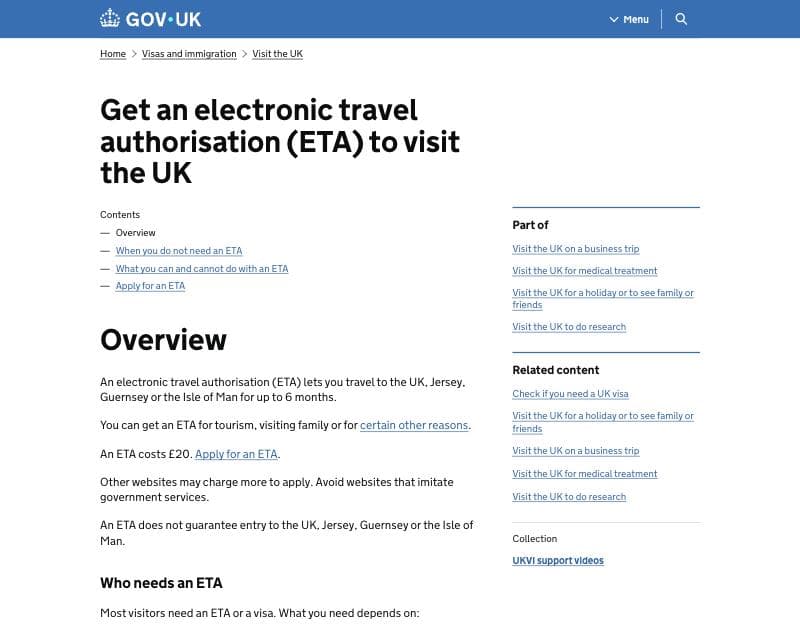
gov.uk/eta, the overview: the £20 fee, the "Apply for an ETA" link and the warning about imitation websites · official site (GOV.UK), captured 12 Oct 2026
12
What to do at this step
1
Before anything, check that you need an ETA at all. The "When you do not need an ETA" page linked here lists who does not need one: British and Irish citizens, holders of a UK visa or eVisa, of settled or pre-settled status, residents of Ireland arriving from Ireland, airside transit passengers. And nationals of countries that need a visa cannot get an ETA at all: GOV.UK's "Check if you need a UK visa" tool settles it in a minute.
2
Only gov.uk and apply-for-an-eta.homeoffice.gov.uk: any other site is a reseller. GOV.UK's own warning is on this page: "Other websites may charge more to apply. Avoid websites that imitate government services." Look-alike sites buy the search results above gov.uk and file the same form with your data for a fee on top; GOV.UK adds that "you cannot get a faster decision by applying through another website or app". The name is ETA, not ETIAS: ETIAS is the EU's scheme for travel to Schengen.
Further down this page: one ETA per traveller, babies included. Under "If you're travelling as a family or group", GOV.UK writes: "Each person travelling needs an ETA, including babies and children." A family of four is four applications and four payments, one passport each; airlines check every passenger, the youngest too.
Travellers who went through this step
Experiences shared by travellers, quoted with their source and date. They describe what happened to them, not a rule; the rules are on gov.uk.
F
I didn't even know we needed and ETA as we travel to Uk every year and was never needed. This is new as of Jan 2025.
my booking in the Fly Delta app does offer two options for applying for the ETA - "apply through our partner, Sherpa or through United Kingdom's government website." There is a button for each.
kayla.p. · Rick Steves Travel Forum · 2025-07 · Atlanta traveller; applied on the official app, approved in under two minutes
M
I did a google search for UK ETA Visa. Did NOT look carefully enough to find official government site (GOV.UK). What came up above it on the search was ETASTravel.
marnamc2 · Rick Steves Travel Forum · 2025-03 · Charged $99 each; cancelled by e-mail and refunded within hours
1
"The easiest way to apply is on the app": app or website
Online screenOfficial screen "The easiest way to apply is on the app", the first screen of the online route · official site, captured 12 Oct 2026
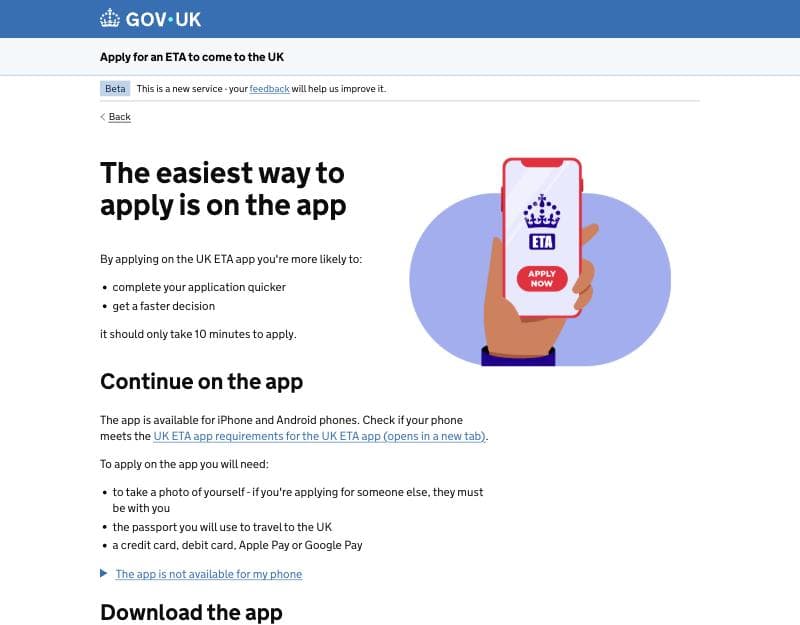
"The easiest way to apply is on the app": what the app needs, and the folded link "The app is not available for my phone" that leads to the online form · official site (Home Office), captured 12 Oct 2026
123
What to do at this step
1
Check your phone before you download the app. GOV.UK's app guide (updated Aug 2026): an iPhone 7 or newer with iOS 16, or an Android phone with Android 12 and NFC ("If you can use your phone to pay for things using contactless, this means it has NFC"), and about 180 MB free. The app reads the passport chip with it, the surest way to get the passport number right.
2
Applying for someone else? On the app, they must be next to you. The app scans the applicant's face, so the person has to be there. GOV.UK: "If the person you're applying for is not with you, you must apply for their ETA online." Online, you upload a photo of their passport and a photo of their face instead.
3
No suitable phone, or the applicant is elsewhere: open "The app is not available for my phone". This folded link (▶) is the way to the online form. It asks the same questions, takes uploaded photos instead of scans, and lets you skip the face scan if your device has no camera.
Travellers who went through this step
Experiences shared by travellers, quoted with their source and date. They describe what happened to them, not a rule; the rules are on gov.uk.
D
TL;DR - the online process is easier! Shoddy app. Doesn't save your application progress, keeps giving errors so you have to restart from scratch
Dan Dascalescu · Google Play, UK ETA app · 2026-07 · Android user, July 2026; finished on the website
E
It took me at least 16 attempts, a few hours, multiple attempts on the online alternative, and paying twice (once via the website and once via the app) before I finally got it to work.
ErinColorado · App Store (US), UK ETA app · 2026-05 · Parent; the 15-year-old son's online application was approved instantly
T
because he's in another state I used the online process. He sent me photos of his passport and a headshot. [...] I simply chose "skip" when it asked me to scan anything (passport or face)
tfontaine · Rick Steves Travel Forum · 2025-10 · Applied online for a boss in another state; approved in 30 seconds
D
While there are about 3 pages of info asking you to use the app, persevere and keep going to the next page - say your phone is not compatible.
Debbie · Rick Steves Travel Forum · 2025-04 · Used the website; approved before finishing the satisfaction survey
2
"How to apply": one sitting, 20 minutes, then your e-mail and a 6-digit code
Online screenOfficial screen "How to apply" of the online form, then the e-mail, code and phone screens that open both routes · official site, captured 12 Oct 2026
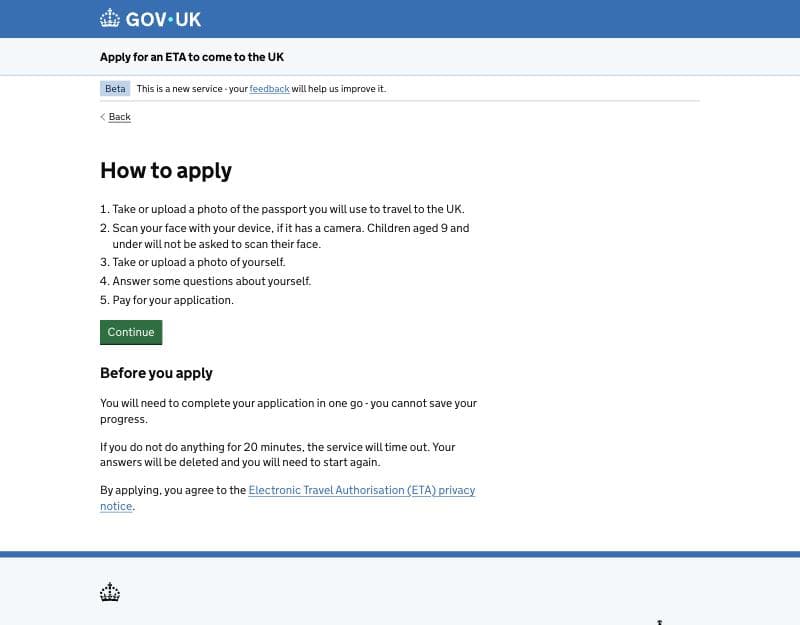
"How to apply": the five steps, "you cannot save your progress", the 20-minute timeout and the privacy notice · official site (Home Office), captured 12 Oct 2026
12
What to do at this step
1
One sitting: nothing is saved, and 20 idle minutes delete everything. The screen says it plainly: "you cannot save your progress", and after 20 minutes without activity "your answers will be deleted". Have the passport, the face photo (online), your home address, your job title and the card on the table before "Continue". App users report the same: close the app and you start again.
2
"By applying, you agree to the privacy notice": nothing is charged yet. The privacy notice covers what the Home Office does with your passport data and face images. Starting costs nothing: you pay only on the last screen, and an application left unfinished is deleted after the 20 minutes.
After "Continue" (not shown here): your e-mail, a 6-digit code, your phone number. Open that mailbox on your phone or computer before you start: the code has to be typed while the clock runs, and it can land in spam. Use an address you will still read later: the decision, with your 16-digit ETA reference, is sent there.
Travellers who went through this step
Experiences shared by travellers, quoted with their source and date. They describe what happened to them, not a rule; the rules are on gov.uk.
I
I had to verify my e-mail using my computer because switching to the mail app on my phone reset the whole process
ironthekid · Google Play, UK ETA app · 2026-06 · Android user, June 2026; the app reset when switching apps
C
it says that you need to do your application in one go and if you do not do anything for 20 minutes, the service will time out. So I suggest taking photos of your passports and yourselves BEFORE you start
CL · Rick Steves Travel Forum · 2025-05 · Regular who applied on the website from an iPad, in Vienna
R
it crashed or said the app wasn't working and restarted me a few times. Needed to get a new verification code and start over each time.
Renee Cantwell · Google Play, UK ETA app · 2025-04 · Applied for several people; still about 10 minutes each
R
Only works if you do everything in one go, no interruptions. [...] I got all the way to the payment screen (the very last one), and accidentally locked my screen. The app sent me back to the beginning
Rebecca Riley · Google Play, UK ETA app · 2025-01 · Android user who locked the screen at the payment step
3
Passport: photo of the photo page, chip scan, check what was read
Online screenOfficial steps "Take a photo of your passport", "Scan the chip in your passport" and the confirmation of the extracted details
The passport photo, chip and "Check your information" screens, worded from the app's own store screenshots and from captures of the online form published in Dec 2024 · mock-up: no capture we may reuse yet
Take a photo of your passport
The photo must show all 4 corners of the details page, the machine-readable zone (MRZ) and the photo of you. Then, on the app only: "Close your passport and remove any cases", "Put the top of the phone halfway down your passport" to read the chip.
Check your information · "Make sure it matches the machine readable zone (MRZ)"
Name
as in the MRZ: A to Z and spaces only
Passport number
read from the photo or the chip · Change
1
Expiry date
DD/MM/YYYY · Change
2
Date of birth
DD/MM/YYYY · Change
Nationality
Change
Country of issue
Change
What to do at this step
1
Check every row against the two MRZ lines at the bottom of your photo page. The screen asks you to "make sure it matches the machine readable zone (MRZ)". An O read as a 0, a 1 as an I, and the ETA is granted on a number that is not yours: the airline's check then finds no ETA for your passport. The name is the MRZ's too, "letters A to Z and spaces": no accents, no hyphens, and the screen says not to worry about that. A wrong row can be changed here; after payment, only a new application fixes it.
2
The passport you scan is the one you fly with, until the expiry date shown here. The ETA is linked to this passport and stops when it expires, if that comes before the two years. A passport renewed later, even with the same name, needs a new ETA and a new fee. If renewal is due, renew first and apply after.
Chip scan, app only: passport closed, cases off, the top of the phone halfway down the passport. The app's own screen: "Close your passport and remove any cases you have on the phone or your passport", then "Put the top of the phone halfway down your passport". With the volume on, it beeps when the chip is read (GOV.UK). If nothing happens, move it slowly over the passport; for US passports GOV.UK adds the inside of the back cover, and travellers with the newer ones report the hard photo page. If the chip will not read, the app takes the details from the photo, which brings you back to tip 1.
Travellers who went through this step
Experiences shared by travellers, quoted with their source and date. They describe what happened to them, not a rule; the rules are on gov.uk.
S
after all that, the scanner misread my name, so now that's listed wrong. Who you gonna call for help? No one, that's who.
SaveusZod · App Store (US), UK ETA app · 2026-09 · Many tries to scan the photo page, then the name misread
E
just make sure the text is clear, four edges are visible, and minimize the glare and reflection as much as possible. [...] And then just submit.
Excited_tomato · App Store (US), UK ETA app · 2026-08 · Chose 'use this photo'; approved before the husband's application was finished
K
Literally this app denied my passport image100x. [...] I finally submitted a pic taken that was rejected but was clear - did the bio scan, paid the $27 and had an approval in my email in seconds.
Kristin150 · App Store (US), UK ETA app · 2026-07 · Photo kept missing the second line; approved in seconds anyway
P
we have new passports where the photo page is hard and laminated. That's the page I had to scan for the chip (using the app). Once I figured that out, the process was quick
Patti · Rick Steves Travel Forum · 2025-03 · Californian with a new passport; ETA confirmation within 5 minutes
4
Your face: the live scan, then the photo
BiometricsOfficial steps "Scan your face" (age 10 and over; can be skipped online) and "Take a photo of yourself" with the official photo rules
The two face screens and the official photo rules the form checks against · mock-up from GOV.UK's published requirements
Scan your face
The camera checks you are a live person in front of the phone. Not asked for children aged 9 and under; the online form lets you skip it if your device has no camera.
Hold your phone's camera in front of your face until the scanning is completeScan face completed
Take a photo of yourself
Background *
plain, light-coloured
1
Framing *
head, shoulders, upper body; facing the camera
Expression *
plain, mouth closed, eyes open and visible
Glasses, head covering
no sunglasses or tinted lenses; covering only for religious or medical reasons
2
File (online form) *
jpg · at least 600 × 750 px · 50 KB to 6 MB · colour · not edited
3
Lighting *
well-lit room, no shadows on the face or behind
What to do at this step
1
A plain light wall, a well-lit room, the phone at eye level. The official rules are mostly about the room: a "plain light-coloured background", a photo "taken in a well-lit room", no shadows on the face or behind it, nothing edited or filtered. No window behind you, hair off the eyes, mouth closed. Someone else holding the phone frames better than a selfie at arm's length.
2
Glasses off if you can; never sunglasses or tinted lenses. Glasses only if you need them, with no glare and no tint (GOV.UK photo rules). No hat, cap or hood; a head covering worn for religious or medical reasons is allowed.
3
A photo the app flags can still be sent, and that is where rejections come from. The app tells you when the photo misses the rules and lets you retake it, or submit it anyway, which GOV.UK allows for a religious or medical head covering. Online, the upload must be a jpg of at least 600 × 750 pixels, 50 KB to 6 MB. GOV.UK: a face photo that breaks the rules means "the application may be delayed or rejected", and a rejection is a new application, paid again.
A photo of you today, never your passport picture. GOV.UK's rules exclude a scan of another photo, your passport photo, an edited or filtered image and a mirrored selfie. No photo-booth format is needed: a phone picture taken today against a plain wall is what is asked.
Travellers who went through this step
Experiences shared by travellers, quoted with their source and date. They describe what happened to them, not a rule; the rules are on gov.uk.
G
make sure you have good lighting for your photo (and ears showing), it was an easy process.
The only problem we had was it needed to redo my husband's face photo because he squints. Worked on his second photo. Got our approval in a few minutes.
Frances Collins · Google Play, UK ETA app · 2026-05 · Couple on a Samsung phone; approved in a few minutes
F
After taking roughly 11 photos [...] and finding that the app didn't like any of them, we got fed up and just applied using the most recent photo we'd taken. About five minutes later, our application was approved.
farnell · Rick Steves Travel Forum · 2025-12 · Applied with a photo the app had flagged, December 2025
C
Am I the only one who was filling out for someone else and when you're asked to take a photo of yourself, I actually took a photo of myself [...] The application got rejected and the money's gone.
costin matei · Google Play, UK ETA app · 2025-12 · Applying for someone else; rejected, paid a second time
5
About you: address, job, other nationalities, a guardian for minors
Online screenOfficial page "Answer some questions about yourself", first part · the form asks nothing about your trip, dates or hotel
The personal-details questions in the order of captures of the online form published in Dec 2024, with the guardian block GOV.UK lists for under-18s and the Crown Dependencies question reported since April 2026 · mock-up
Answer some questions about yourself
Phone number *
with country code
Your home address *
"the address where you live most of the time"
Do you have any other nationalities? *
Yes / No · "Include any nationalities you have had in the past"
1
Do you have a job? *
Yes, I have a job ("For example, teacher") / No, I do not have a job
2
Where will you spend most of your time?
UK / Jersey / Guernsey / Isle of Man
Parent or guardian (under 18)
contact details of a person with parental responsibility
What to do at this step
1
Other nationalities: every one you have, and every one you had. The screen asks you to "Include any nationalities you have had in the past". Holding or having held another nationality is not a problem; hiding one is a false declaration, which is a mandatory refusal ground. The question exists above all to catch British and Irish citizens, who cannot get an ETA.
2
Job: a plain title, and retired, student or unemployed is simply "No". The question is "Do you have a job?", self-employed included, then a free box: "For example, teacher. If you have more than one job, list all of them." No employer, no payslip. Employment is not among the refusal grounds of the Home Office's ETA guidance: answering No changes nothing.
No travel dates, no flight, no hotel: do not look for them. The ETA is tied to you and your passport, not to a trip; the Home Office's own app description says "You do not need to enter your travel details." That is why the same ETA covers your next trips too.
Travellers who went through this step
Experiences shared by travellers, quoted with their source and date. They describe what happened to them, not a rule; the rules are on gov.uk.
J
App asked for local address while staying in the UK. A drop down menu had a list of countries but was absent England and UK. Annoying.
that put the string USA in the country field. After that, the green Continue button did not respond. [...] when I used the menu to change USA into United States then the app worked.
Phil Burk · Google Play, UK ETA app · 2025-09 · US Android user who let auto-completion fill the home address
A
On the question if she had a job or not, I clicked yes and put her occupation as retired. I don't know if this helps, but on my application I had said I didn't have a job.
Allan · Rick Steves Travel Forum · 2025-08 · Canadian; his own wait was 36 hours, his mother-in-law's instant
A
I am a dual UK and US citizen. However, I didn't renew my British passport [...] The system asked to identify any other citizenship I have/had. [...] None of these seem to apply for a regular British citizen.
affan6 · Rick Steves Travel Forum · 2025-07 · Dual British-US citizen, British passport not renewed since 2012
6
The suitability questions: criminal convictions and the security question
Online screenOfficial page "Answer some questions about yourself", second part · one question on criminal convictions, then one on war crimes, terrorism and extremism
The two questions as worded on captures of the online form (Dec 2024) and of the app (Feb 2025) published by third parties; the Home Office caseworker guidance (v9.0, Aug 2026) describes them as a conviction in the last 12 months, a prison sentence of more than 12 months, and war crimes, terrorism or extremism · mock-up
Criminal convictions
If yes: the nature, date and country of the conviction, the type of sentence (custodial or suspended) and its length (Home Office guidance).
1Have you ever had a criminal conviction? "Include convictions from any country."Yes / No
Have you ever been involved in, or suspected of, any of the following?
war crimes, genocide or crimes against humanity
terrorism including support for, or membership of, terrorist groups
supporting extremist groups or expressing extremist viewsYes / No
What to do at this step
Criminal conviction: the screen asks "ever", in any country. Captures of the form show "Have you ever had a criminal conviction?" and "Include convictions from any country": an old conviction is a Yes, even one punished only by a court fine. An arrest that never led to a conviction is a No, and the screen adds that convictions for things legal in the UK need not be declared. What leads to refusal is narrower: a conviction in the last 12 months, or a custodial or suspended sentence of 12 months or more (caseworker guidance v9.0, Aug 2026).
A truthful Yes is not an automatic refusal; a false No is. Answer Yes and the form asks for the nature, date and country of the conviction and the sentence; the application then goes to a caseworker instead of the automatic check. A No that Home Office records contradict is a mandatory refusal for false information or non-disclosure, and for war crimes, terrorism or extremism a refusal on "non-conducive" grounds (caseworker guidance v9.0, sections 8.4 and 8.6).
A criminal record, a past UK refusal or an overstay: the visitor visa may be the safer route. GOV.UK: people with a criminal record or a previous refusal of entry "may want to apply for a Standard Visitor visa instead". The guidance also makes an ETA refusal mandatory after a refused UK visitor visa or entry (unless a later permission was granted knowing it), an overstay of more than 30 days as an adult, or a deportation order. An ETA refusal has no appeal; the visitor visa costs £135 and usually takes 3 weeks (GOV.UK, 16 Oct 2026).
Travellers who went through this step
Experiences shared by travellers, quoted with their source and date. They describe what happened to them, not a rule; the rules are on gov.uk.
K
He has a 40 year old felony conviction for bringing marijuana into the United States. He served 3 years [...] His ETA was denied and he was instructed to apply for a visa which he did. [...] He was denied the visa.
kudzuivey · Rick Steves Travel Forum · 2025-08 · Poster's partner: 40-year-old felony; ETA, then visa, refused
J
Wait, like I stated earlier, the app asks, “Have you ever had a criminal conviction?” [...] It doesn’t mention anything about 12 months etc.
jparrott46 · Rick Steves Travel Forum · 2025-03 · US parent; son, 22, convicted of drunk driving in 2022, fined
A
I filled out our applications and my husband's was denied because he has a criminal record. He has a burglary conviction with a one year jail sentence and a drug possession conviction with three years in prison.
amber.mc92 · Rick Steves Travel Forum · 2024-11 · US couple planning Scotland; husband's last conviction in 2013
7
Review: the last screen where anything can still be changed
Online screenOfficial review screen before payment · after this, no edit is possible: a mistake means a new application and £20 again
The "Check your answers" and "Declaration" screens, worded from captures of the online form (Dec 2024) and of the app (Feb 2025) published by third parties; on the online form the passport details are not repeated here, they are checked on "Check your information" (screen 3) · mock-up
Check your answers
Email
Change
1
Phone number
Change
Home address
Change
Other nationalities
Change
Job
Change
Criminal convictions
Change
2
Involvement in war crimes, terrorism, extremism
Change
Declaration: "If you have given any false information: your application can be refused, you may be prosecuted, you may be banned from the UK." On the app: "You cannot change your answers once you continue."Continue to payment
What to do at this step
1
E-mail address: one typo and the decision never reaches you. The ETA can be granted and the e-mail with its 16-digit reference lost. GOV.UK's "Check your ETA" service can still confirm it from your passport, but only once a decision exists, and only after an anxious wait.
2
Criminal convictions and the involvement row: reread them before the Declaration. The next screen, "Declaration", is what you sign: "If you have given any false information: your application can be refused; you may be prosecuted; you may be banned from the UK." A No you are unsure of is the answer to reread now, with "Change".
After "Continue to payment", nothing can be changed. The app's declaration says it plainly: "You cannot change your answers once you continue", and the Home Office guidance adds that "Any request made to the Home Office to withdraw or amend an ETA application should be refused" (v9.0, 4.5). On captures of the online form the passport details are not repeated here: they are checked once, on "Check your information" (screen 3), which is the screen to take slowly.
Travellers who went through this step
Experiences shared by travellers, quoted with their source and date. They describe what happened to them, not a rule; the rules are on gov.uk.
A
My only issue is that I messed up and tried to go back and it made me start the whole process over again, pictures and all. It doesn't save after each point
Angie · Google Play, UK ETA app · 2026-02 · Android user, February 2026; otherwise found the app simple
F
Certain stages don't allow you to go back if you have made an error. So you have to start all over again deleting the app and reinstalling it.
on the "Check your answers" screen there was a typo on my name and that's the only field that's not editable. As there's no way to go back [...] the process has to be fully restarted.
Alexandre Gomes · Google Play, UK ETA app · 2025-03 · Android user; the name came out misspelled on every attempt
8
Pay £20, get "Application submitted", wait for the e-mail
PaymentOfficial page "Pay for your application" · card, Apple Pay or Google Pay; the price is shown in your currency
The payment screens, worded from GOV.UK's app guide and from captures of the online form (Dec 2024, when the fee was £10) and of the app (Feb 2025), then the confirmation · mock-up
Pay for your application
Which country are you applying from?
"This determines the currency that you will use to pay"
1
Your payment *
£20 in that currency · "This includes fees for currency conversion"
Payment method *
Visa, Mastercard, American Express, JCB, Apple Pay, Google Pay
Card details *
online, on Worldpay's payment page
Your bank may ask for a confirmation (3-D Secure)in your banking app
Application submittedreference on screen and by e-mail
What to do at this step
1
Pick the country whose currency your card is in. The country you choose "determines the currency", and the amount shown "includes fees for currency conversion" (captures of the form, 2024 and 2025); GOV.UK's app guide confirms the price is in your local currency, "which you can change". Pay in your card's own currency, so that your bank does not convert a second time; reviewers say there is no way back once the currency is chosen.
Your bank's check (3-D Secure): keep the banking app at hand, and pay only once. Online, "Continue to payment on Worldpay" opens the payment provider's page: it is still the official route. GOV.UK warns that your bank may ask for a code or a confirmation in its app. If the screen hangs after paying, look for the confirmation e-mail and your bank statement before paying again: a second payment starts a second application.
"Application submitted" is not "approved". The decision is a separate e-mail with a 16-digit ETA reference. GOV.UK: "You must wait until you get an email confirming you have an ETA before you travel to the UK." The submission screen proves nothing at check-in.
Travellers who went through this step
Experiences shared by travellers, quoted with their source and date. They describe what happened to them, not a rule; the rules are on gov.uk.
H
Saw in reviews that they charged in USD and that has since been changed. Charged in CAD as of oct 2026. App worked great and quick approval.
this wouldn't accept payment even after trying 2 credit cards, a debit card and even linking Applepay [...] Didn't feel like trying online so just cancelled all my London reservations
NJacuguy · App Store (US), UK ETA app · 2026-09 · Told by the airline mid-trip in Europe; applied at the airport
E
If you're completing more than one ETA (eg, for someone else), know that you will have to complete one at a time. There's no "add a person" feature so expect to check out and pay for each application
Excited_tomato · App Store (US), UK ETA app · 2026-08 · Applied for two, one after the other, August 2026
J
There is no option to go back when paying if you selected the wrong currency. 2. If you don't get. Verification step right, it sends you back to the beginning. 3. Very difficult to use this with a child.
After you submit: what the official e-mail says, and what to do
ETA grantedAn e-mail from UK Visas and Immigration with a 16-digit reference, usually within minutes. Nothing to print, nothing to show: the ETA is linked to your passport, airlines and e-gates read it from the passport number. Valid 2 years or until the passport expires, unlimited trips, 6 months each. Granted does not mean admitted: the officer at the border decides.
Still waiting after a daySome files go to a person: a Yes on the criminal questions, a doubtful photo, a passport that could not be read. Up to 3 working days is normal. Check the spam folder, do not re-apply (you would pay twice), and only after 3 working days contact UKVI through the ETA webchat; there is no phone line.
Rejected or refusedRejected (identity, photo, mismatch): apply again, properly, £20. Refused (suitability): no appeal, no review; the route is a Standard Visitor visa, £135, with a decision usually within 3 weeks (GOV.UK, 16 Oct 2026).
Your dates, in order
Day 0
Application submitted and paid. Note the e-mail address you used: the decision and the reference go there.
Day 0 + minutes
Most decisions arrive now. Check the passport number quoted in the e-mail against your passport.
Day 3 (working days)
Still nothing: spam folder, then the UKVI ETA webchat. No new application.
D − 1
Check your ETA on the official "Check your ETA" service with the passport you applied with. Airlines check it at check-in since 25 Feb 2026.
+ 2 years
Expiry, or earlier if the passport expires first. A new passport = a new ETA, even before the date.
Travellers who went through this step
Experiences shared by travellers, quoted with their source and date. They describe what happened to them, not a rule; the rules are on gov.uk.
M
I dug through my files and fortunately kept a printed copy of my original email of the approval from last spring, but I had accidentally deleted the actual email.
Mustlovedogs · Rick Steves Travel Forum · 2026-07 · US traveller checking expiry on the new gov.uk/check-eta page
T
When I got to passport control in the UK, I scanned the passport at the automated gate, it took my pic/scanned my retina [Whoa, Big Brother!] and was on the other side in less than a minute
Topher Taylor · Google Play, UK ETA app · 2026-06 · Android user, June 2026, after several attempts in the app
T
It's been 3 hours since I applied, but haven't received approval. I applied for my wife and daughter after, and their applications were approved within few minutes.
techtrainer61 · Rick Steves Travel Forum · 2025-07 · Wife's and daughter's came in minutes; his took almost 15 hours
L
my ETA application has been rejected twice. I used the app on my iPhone both times. Every step in the app was approved by the app. They give me the same 3 "possible" reasons for the rejections.
lowlyduane · Rick Steves Travel Forum · 2025-04 · American iPhone user; rejected twice, paid twice
P
She insisted upon seeing written documentation or proof that I did, indeed, have an ETA. So I pulled out my phone and pulled up the December email from UK ETA. She accepted that and then issued me a boarding pass.
my wife's came back with her middle name misspelled. [...] "It only needs to match your name in the first line of the machine-readable zone (MRZ) on your passport."
hermanhowerton · Rick Steves Travel Forum · 2025-01 · Quoting the approval e-mail; the poster's own ETA was fine
Already have an ETA? Is it still valid for this trip?
Don't know the date? The official "Check your ETA" service finds it with the passport you applied with and shows the expiry. Nothing here is computed anywhere but in your browser.
Travel insurance
One last thing before you leave
An ETA covers no medical care. An EU health card still opens the NHS for urgent treatment, but nothing else: no repatriation, no private clinic, no cancelled trip; visitors from outside Europe have no cover at all. Compare travel insurance for the United Kingdom, with hospital bills settled directly.
Sources: gov.uk/eta (overview, "When you do not need an ETA", "Apply for an ETA"), the "Using the UK ETA app" guide (updated Aug 2026) and the Home Office online service (step list, photo rules, 20-minute timeout), the ETA caseworker guidance v9.0 (Aug 2026, sections 4.5, 8 and 9) for the suitability questions and refusal grounds, the Home Office fee table of 8 October 2026 (ETA £20, Standard Visitor visa £135), the Home Office news of 24 Feb 2026 on enforcement, the ETA factsheet of April 2026. Rules read on 16 October 2026, captures taken on 12 October 2026, currency conversion at the ECB reference rate of 15 October 2026. GOV.UK does not publish the screens past the privacy notice: the mock-ups take their wording from the app's store screenshots and from captures of the online form (Collette, Dec 2024) and of the app (The Points Guy, Feb 2025) published by third parties, cross-checked with the caseworker guidance (sections 9.1 and 9.2). Contains public sector information licensed under the Open Government Licence v3.0. www.gov.uk